
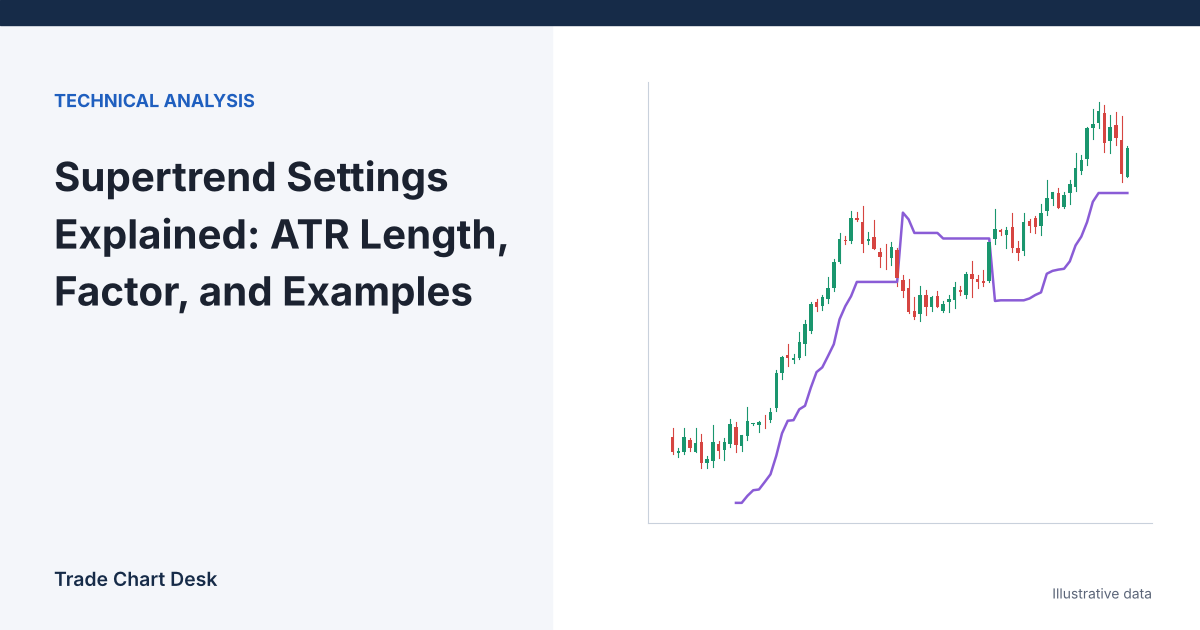
You add Supertrend to a 4-hour BTC chart, it flips red the moment you buy, and the obvious fix seems to be “change the settings.” Before you touch either input, it helps to know exactly what each one moves. Supertrend has only two knobs, and they do different jobs: the factor sets how far the line sits from price, and the ATR length sets how quickly that distance adapts when volatility changes. This article calculates the line by hand for five bars, then shows what changes when you adjust each input and how the line translates into a position size.
The formula in plain terms
TradingView’s Supertrend help page gives the calculation:
- Midpoint: hl2 = (high + low) ÷ 2
- Basic upper band = hl2 + factor × ATR
- Basic lower band = hl2 − factor × ATR
- Final lower band: use the new basic lower band only if it is higher than the previous final lower band, or if the previous close was below the previous final lower band. Otherwise keep the previous value.
- Final upper band: use the new basic upper band only if it is lower than the previous final upper band, or if the previous close was above it. Otherwise keep the previous value.
- In an uptrend the Supertrend line is the final lower band. The trend flips down when a close falls below it, and the line jumps to the upper band. The reverse applies in a downtrend.
The third and fourth rules are the important ones. They make the line a ratchet: during an uptrend the lower band can rise or stay flat, but it cannot fall. That is why Supertrend behaves like a trailing stop rather than an envelope.
ATR is Wilder’s Average True Range. TradingView’s ATR reference defines true range as the largest of high − low, |high − previous close| and |low − previous close|, smoothed with an RMA (Wilder’s moving average) by default. The built-in Supertrend opens with ATR length 10 and factor 3; check the Inputs tab on your platform, because other charting tools and community scripts use different defaults and sometimes a simple average of true range instead.
Five bars by hand
Illustrative 4-hour BTC/USDT bars, factor 3, ATR values given (in practice your platform calculates them). Coming in, the trend is up, the previous final lower band is 58,500, the previous final upper band is 63,500, and the previous close was 60,800.
| Bar | High | Low | Close | ATR | hl2 | Basic lower | Final lower | Final upper | Trend / line |
|---|---|---|---|---|---|---|---|---|---|
| 1 | 61,200 | 60,400 | 61,000 | 500 | 60,800 | 59,300 | 59,300 | 62,300 | Up / 59,300 |
| 2 | 61,800 | 60,900 | 61,600 | 510 | 61,350 | 59,820 | 59,820 | 62,300 | Up / 59,820 |
| 3 | 62,000 | 61,300 | 61,500 | 520 | 61,650 | 60,090 | 60,090 | 62,300 | Up / 60,090 |
| 4 | 61,600 | 60,500 | 60,700 | 560 | 61,050 | 59,370 | 60,090 | 62,300 | Up / 60,090 |
| 5 | 60,800 | 59,600 | 59,800 | 600 | 60,200 | 58,400 | 60,090 | 62,000 | Down / 62,000 |
Check bar 1: 60,800 − 3 × 500 = 59,300, which is above the previous 58,500, so the final lower band rises. On bar 4 the basic band falls to 59,370, but the ratchet keeps the final band at 60,090. On bar 5 the close of 59,800 is below 60,090, so the trend flips down and the line moves to the final upper band. The upper band on bar 5 uses the new basic value of 62,000 because it is below the previous 62,300.
Two practical observations come out of the table. First, the flip happens on the close. Bar 5 traded below the line intrabar, but on a live bar the color can change and change back until the bar closes. Second, the line on bar 5 is 2,200 above the close. A trader who “flips short on the signal” is taking a trade with a reference stop that far away.
What each setting actually moves
| Change | Mechanical effect | What you will see |
|---|---|---|
| Factor 3 → 2 | Band distance shrinks by one third (3 × ATR to 2 × ATR) | More flips, smaller give-back per flip, more whipsaws in ranges |
| Factor 3 → 4 | Distance grows by one third | Fewer flips, later exits, larger loss when a trend fails |
| ATR length 10 → 5 | ATR reacts faster to one or two large candles | Bands widen sharply after a spike, then tighten quickly |
| ATR length 10 → 20 | ATR changes slowly | Distance stays steadier; slow to widen when volatility jumps |
The factor is the main lever. ATR length mostly changes how the distance reacts to volatility shifts, not the average distance. If you want fewer flips, raise the factor first. If one news candle keeps wrecking your bands, lengthen ATR.
Timeframe matters as much as either input. ATR is measured in price units per bar, so factor 3 on a 15-minute chart is a much tighter stop in absolute terms than factor 3 on a daily chart. Compare settings only within the same timeframe.
Turning the line into a position size
Supertrend is most useful as a stop reference, because it hands you a stop level on every bar. Using bar 2 above as an illustrative long entry:
- Entry at the bar 2 close: 61,600. Stop at the Supertrend line: 59,820. Distance: 1,780.
- Account: $10,000. Risk per trade: 1% = $100.
- Position size: 100 ÷ 1,780 = 0.0562 BTC (about $3,460 notional).
With factor 2 instead, the basic lower band on bar 2 would be 61,350 − 2 × 510 = 60,330, a distance of 1,270 from entry. The same $100 risk now buys 100 ÷ 1,270 = 0.0787 BTC. A tighter setting does not reduce risk if you size from the stop; it changes how often you are stopped and how large the position is. Our position sizing guide covers the formula in detail, including fees and slippage.
Where Supertrend fails
- Sideways markets. In a range roughly as wide as 2 × factor × ATR, price crosses the line repeatedly. Each flip is a small loss plus fees. This is the cost of any trend-following tool; see trend following vs. mean reversion for how to tell the regimes apart.
- Late flips after a sharp reversal. In the table, the exit at the bar 5 close (59,800) came 1,700 below the bar 3 close of 61,500. Strong V-shaped reversals give back a full band width.
- Gaps and wicks on thin pairs. A single wick can inflate ATR for the next 10 bars, pushing bands away just as price calms down.
- Curve-fitting. Testing dozens of factor and length pairs on one coin’s history and picking the best one mostly finds noise. Pick a small set (for example factor 2, 3, 4 with length 10) and judge them on several coins and periods.
How to test settings yourself
- On TradingView, add the built-in Supertrend Strategy, which uses the same two inputs, and open the Strategy Tester.
- Set realistic commission and slippage in the strategy properties. Supertrend flips often, so costs change results noticeably.
- Run factor 2, 3 and 4 on the same symbol and timeframe. Record number of trades, profit factor and maximum drawdown for each.
- Repeat on a second coin and a different year. If the “best” factor changes each time, treat the setting as a risk preference, not an edge.
- Log live trades taken with the line as a stop in a trading journal so you can compare the stop distance you planned with what actually happened.
If you want a trailing method that speeds up with time rather than volatility, compare this with Parabolic SAR, which tightens a little every bar the trend extends.
Financial disclaimer: This article is for educational purposes only and is not financial, investment, or trading advice. Trading involves substantial risk of loss. Example figures are illustrative.
1 thought on “Supertrend Settings Explained: ATR Length, Factor, and Examples”