
Most squeeze tutorials say “when the bands get narrow, a big move is coming.” That sentence hides two problems. First, “narrow” means nothing until you put a number on it. Second, a squeeze tells you volatility is low, not which way price will leave. This tutorial fixes both: you will calculate the bands and BandWidth by hand, turn “narrow” into a rule you can scan for, and then deal with the head fake that catches most people who trade the first break.
BandWidth is not the only way to define a squeeze. A popular variant flags one when the Bollinger Bands move inside a Keltner Channel, which measures width with ATR instead of standard deviation; the guide to Keltner Channels explains that comparison. This tutorial sticks to BandWidth because it gives you a single number you can test.
Calculate the bands yourself once
Bollinger Bands have three lines. With the standard settings of 20 periods and 2 standard deviations:
- Middle band = 20-period simple moving average (SMA) of the close
- Upper band = middle band + 2 × the 20-period standard deviation of the close
- Lower band = middle band − 2 × the same standard deviation
John Bollinger’s own list of Bollinger Band rules describes 20 and 2 as starting values, not magic numbers. He also suggests nudging the multiplier when you change the length: about 1.9 at 10 periods and 2.1 at 50 periods. One detail that trips up people who rebuild the indicator in a spreadsheet: TradingView’s Pine Script ta.stdev() uses the population formula (divide by n) by default. Excel’s STDEV.S divides by n − 1 and will give slightly wider bands. Use STDEV.P if you want to match the chart.
Worked example (illustrative 4-hour closes)
Suppose the last 20 four-hour closes on BTC/USDT were:
60,100 · 60,250 · 59,980 · 60,050 · 60,300 · 60,420 · 60,180 · 60,010 · 59,900 · 60,060 · 60,200 · 60,350 · 60,280 · 60,150 · 60,030 · 59,950 · 60,120 · 60,260 · 60,400 · 60,310
- SMA(20) = 1,203,300 ÷ 20 = 60,165
- Population standard deviation ≈ 149.72
- Upper band = 60,165 + 2 × 149.72 ≈ 60,464
- Lower band = 60,165 − 2 × 149.72 ≈ 59,866
The whole channel is about 599 dollars wide on a price near 60,000. That raw width is hard to compare across assets or years, which is why BandWidth exists.
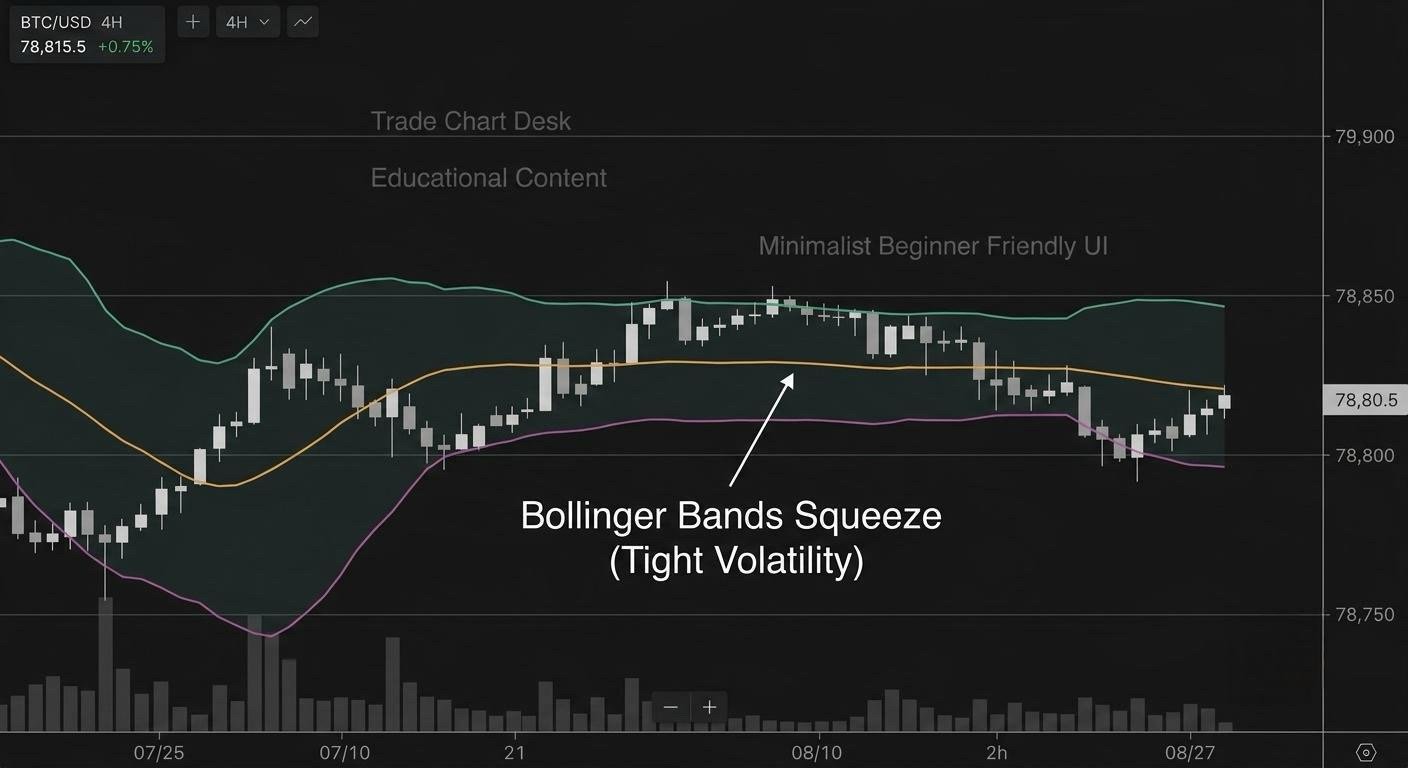
BandWidth turns “narrow” into a number
Both StockCharts ChartSchool and TradingView’s Bollinger BandWidth (BBW) indicator use:
BandWidth = (Upper − Lower) ÷ Middle × 100
In the example: (60,464 − 59,866) ÷ 60,165 × 100 ≈ 1.00. The bands span about 1% of price. Because the upper minus lower band is just 4 standard deviations, BandWidth is really 4 × standard deviation ÷ SMA, a normalised volatility reading. That is why a BandWidth of 1.0 on BTC and a BandWidth of 1.0 on a small altcoin mean the same thing in percentage terms.
A value of 1.00 is still not “low” or “high” on its own. Different coins and timeframes have very different normal ranges. ChartSchool recommends judging BandWidth against its own history over roughly 8 to 12 months, and calling it narrow when it nears the bottom of that range. Bollinger’s rules describe identifying “The Squeeze” as BandWidth’s most popular use but leave the exact threshold to you.
A squeeze rule you can actually scan for
Here is one way to write it down. The numbers are choices you should test, not standards.
- Pick a lookback that matches your timeframe. About six months of data is a common choice. On daily candles that is about 180 bars in crypto (markets trade every day). On 4-hour candles it is about 6 × 180 = 1,080 bars.
- Find the lowest and highest BandWidth in that window. Say the lowest is 0.95 and the highest is 9.00.
- Define the squeeze zone. For example: current BandWidth is within 10% of the window’s range above its minimum. Here that is 0.95 + 0.10 × (9.00 − 0.95) ≈ 1.76. Any reading at or below 1.76 counts as “in a squeeze.”
- Record the squeeze high and low. While the squeeze is active, note the highest high and lowest low of the candles inside it. Those are your breakout levels, and they are usually more meaningful than the band lines, which keep moving.
Our example reading of 1.00 would qualify. TradingView’s BBW indicator includes “Lowest Contraction” and “Highest Expansion” lines with adjustable lengths, which do steps 2 and 3 visually.
The head fake: why the first break is suspect
When volatility is compressed, a small amount of buying or selling is enough to close a candle outside a band. That first break often reverses and the real move goes the other way. Bollinger calls this the head fake, and StockCharts’ article on spotting squeezes shows examples where BandWidth stayed shaky during the fake breaks and only expanded cleanly when the real move began.
The fake is easier to recognise if you ask three questions about the breakout candle:
| Check | Real breakout tends to show | Head fake tends to show |
|---|---|---|
| Close vs. squeeze range | Closes beyond the squeeze high or low, not just beyond the band | Pokes past the band but closes inside the squeeze range |
| BandWidth | Rises on the breakout bar and keeps rising | Ticks up one bar, then flattens or falls |
| Volume | Clearly above its recent average | Average or below |
None of these is proof. They are filters that reduce the number of fakes you take, at the cost of entering later. Our guide on volume confirmation for breakouts goes deeper on the volume check.
From squeeze to trade: one complete plan
Continuing the illustrative example. The squeeze range is 59,900 to 60,420. A 4-hour candle closes at 60,520, above both the upper band and the squeeze high. BandWidth rises and volume is above average.
- Entry: 60,520 (close of the breakout candle)
- Stop option A, middle band: 60,165. Distance = 355.
- Stop option B, opposite side of the squeeze: at the lower band as it stood before the break, 59,866. Distance = 654.
- Risk: 1% of a $10,000 account = $100.
- Position size: option A = 100 ÷ 355 ≈ 0.282 BTC; option B = 100 ÷ 654 ≈ 0.153 BTC.
Option A gives a bigger position but gets knocked out by a normal retest of the middle band. Option B survives a head fake that dips back into the range but is still wrong if price falls through the whole squeeze. The dollar risk is the same in both. The position sizing guide explains the formula.
For exits, the squeeze itself gives no target. Common choices are a trailing stop on the middle band, or a volatility-based trail as in our ATR trailing stop guide. A useful warning sign is a “walk” along the upper band that stalls: Bollinger’s rules note that closes outside the bands are initially continuation signals, not reversal signals, so a single tag of the band is not a reason to exit.
Where squeeze trading breaks down
- Squeezes can last much longer than expected. Low volatility can persist for weeks, and a rule that enters on every small band poke will bleed through the whole period.
- Scheduled events distort it. Volatility often compresses ahead of known releases such as US CPI or FOMC decisions. The resulting break is driven by the news, and the first candle can reverse violently. See our note on CPI and Bitcoin volatility.
- Weekend and low-liquidity periods. Thin order books produce wicks through the bands that close back inside. Requiring a candle close helps.
- Changing the settings changes the squeeze. A 10-period band will show squeezes a 20-period band does not. Pick settings before you scan, not after.
- Treating a band tag as a signal. Bollinger is explicit that tags are tags, not buy or sell signals.
Test it on your own chart
- On TradingView, add Bollinger Bands (20, 2) and Bollinger BandWidth (20, 2) to a 4-hour BTC/USDT chart.
- Scroll back at least a year. Mark every period where BandWidth sat in your squeeze zone from the rule above.
- For each squeeze, log: date, squeeze high and low, direction of the first close outside the range, whether that break failed within 5 bars, and the result in R using one of the stop options.
- After 20 or more squeezes, look at how often the first break was a fake, and whether the volume and BandWidth filters would have changed the outcome.
A simple spreadsheet is enough. If the fake-break rate is high on your market and timeframe, that is a reason to wait for the retest or the second break, not a reason to tweak the band settings until history looks better.
Financial disclaimer: This article is for educational purposes only and is not financial, investment, or trading advice. Trading involves substantial risk of loss. Example figures are illustrative.